What is a WiFi Smart Doorbell and How Does It Work?
In recent years, the WiFi Smart Doorbell has transformed how we manage home security and communicate with visitors. Experts like Dr. Emily Foster, a leading authority in home automation, emphasize its impact: "A WiFi Smart Doorbell brings convenience and safety, but users must be aware of privacy considerations." This technology does more than just alert residents when someone is at the door. It integrates video, audio, and smart features, allowing homeowners to monitor their entryways remotely.
The inner workings of a WiFi Smart Doorbell involve a camera, microphone, and speaker connected to the home’s WiFi network. This allows for real-time interaction with visitors, even when the homeowner isn’t present. However, the rapid adoption of this technology raises questions about data security and personal privacy. While many users appreciate the convenience, some face the challenge of ensuring their video feeds remain secure.
Understanding the potential of a WiFi Smart Doorbell is essential. It offers enhanced security, but users should remain vigilant. Balancing convenience with privacy concerns is a fundamental aspect of this evolving technology. It's not just about the doorbell; it’s about safeguarding our homes and personal information in an increasingly connected world.
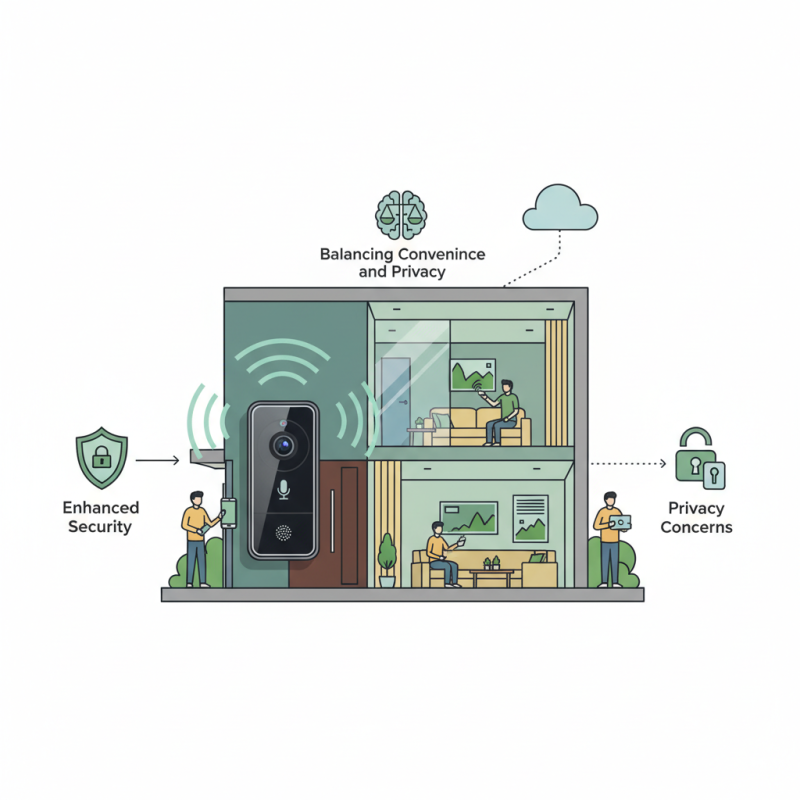
Definition of WiFi Smart Doorbells and Their Features
WiFi smart doorbells are innovative devices that blend security with convenience. They allow homeowners to see and communicate with visitors remotely using their smartphones. According to a report by Research and Markets, the global smart doorbell market is expected to grow at a compound annual growth rate (CAGR) of over 25% from 2021 to 2027. This rapid expansion highlights a growing interest in enhanced home security solutions.
These devices typically come equipped with features like high-definition cameras, motion detection, two-way audio, and night vision. A survey by Statista found that 34% of users feel safer knowing they can monitor their front doors. However, privacy concerns linger. Some users worry about data collection and potential security vulnerabilities. It’s crucial to address these while realizing the device's benefits.
Installation is often simple, but some users struggle with WiFi connectivity issues. This aspect can lead to frustration if the doorbell frequently disconnects. While these devices enhance safety, they are not foolproof. Homeowners should still consider traditional security methods. Balancing technology with personal security is essential for anyone looking to invest in smart doorbells.
Components of a WiFi Smart Doorbell System
WiFi smart doorbells are becoming increasingly popular due to their capability to enhance home security. These systems typically consist of a camera, microphone, speaker, and motion sensor, all working together to provide real-time monitoring. According to industry data, the global smart doorbell market is expected to reach $4.1 billion by 2026, showcasing significant consumer interest.
The camera often offers high-definition video, allowing homeowners to see who is at the door. The microphone and speaker enable two-way communication, empowering users to speak with visitors remotely. The motion sensor alerts homeowners to any movement, ensuring they are always aware of their surroundings. Research indicates that 70% of consumers prioritize these features when selecting a smart doorbell.
Tips: When installing your smart doorbell, ensure it has a clear view of your entrance. Position it high enough to capture faces but low enough for easy access. Regularly check for software updates, which enhance security and performance.
Remember, data privacy is vital. Review the terms of service and how your information is managed. Consumers must remain vigilant against potential vulnerabilities, as smart devices can become prime targets for hackers. Engage with your device frequently to understand its capabilities and limitations.
How WiFi Smart Doorbells Connect to Home Networks
WiFi smart doorbells are gaining popularity for modern homes. These devices allow you to see and interact with visitors remotely. They connect to your home WiFi network, creating a simple yet effective communication tool. The setup process typically requires a stable internet connection, and a compatible smartphone or tablet.
When you install a WiFi smart doorbell, it links to your existing WiFi network. This connection enables the doorbell to send notifications and stream video directly to your device. Most models use a dedicated app, giving you live feed access. However, network strength can affect performance. A weak WiFi signal may lead to lag or disconnection.
Some users report difficulties during setup. Aligning the doorbell's camera for the best view can be tricky. Ensuring it's correctly positioned involves trial and error. Regularly checking your WiFi strength helps maintain the device's reliability. If problems arise, restarting your router often is a quick fix. With some attention, a WiFi smart doorbell can significantly enhance your home security.
What is a WiFi Smart Doorbell and How Does It Work? - How WiFi Smart Doorbells Connect to Home Networks
| Feature | Description | Connectivity | Power Source |
| Video Streaming | Live video feed accessible via smartphone app. | WiFi (2.4 GHz & 5 GHz) | Hardwired or battery-operated |
| Motion Detection | Detects movement and sends alerts. | WiFi | Battery or hardwired |
| Two-Way Audio | Allows communication with visitors through a built-in speaker and microphone. | WiFi | Hardwired or battery |
| Night Vision | Infrared technology for visibility in low light conditions. | WiFi | Battery or wired |
| Cloud Storage | Stores video footage in the cloud for later access. | Internet access required | N/A |
Functionality and Usage of WiFi Smart Doorbells
WiFi smart doorbells have become popular in modern homes. They offer a unique way to enhance security and convenience. These devices allow homeowners to see who is at their door without being physically present. With a built-in camera and microphone, they facilitate two-way communication. Users can speak to visitors and even discourage unwanted guests.
Functionality is what sets WiFi smart doorbells apart. When someone rings the doorbell, an alert is sent to the homeowner's smartphone. This can be incredibly useful when away from home. The high-definition video feeds often come with night vision capabilities. This ensures clear visibility, even in low-light conditions. Homeowners can set up motion detection alerts, enhancing security. However, sensitivity settings may need adjustment.
Using a WiFi smart doorbell is straightforward. The installation process usually requires minimal tools. Many devices are battery-operated, providing flexibility in placement. While these doorbells are efficient, some users report connectivity issues. Occasionally, WiFi strength in certain areas can pose problems. It’s essential to consider your home layout. Regular software updates can help maintain performance but might not always resolve every issue.
Benefits and Considerations of Installing a Smart Doorbell
WiFi smart doorbells have gained popularity for their convenience and security features. According to a report by Parks Associates, over 23% of U.S. households had a smart doorbell in 2022. This number is expected to rise as more consumers recognize their benefits. Smart doorbells allow homeowners to monitor their entrances remotely. They send alerts to smartphones, enabling communication with visitors without being physically present.
Installing a smart doorbell can enhance home security and provide peace of mind. They often come with features like HD video, night vision, and two-way audio. A survey by the Consumer Technology Association found that 70% of respondents felt safer with a smart doorbell. However, potential users should consider factors like WiFi reliability and installation costs. Some doorbells may require professional installation, which can add to the overall expense.
Tip: When choosing a smart doorbell, assess your WiFi coverage. Poor connectivity can hinder functionality. Opt for a model with a rechargeable battery if you prefer an easy installation. Evaluate the video storage options as well, since some devices require cloud subscriptions for continuous recordings. Balancing these factors with your security needs is essential.